Mateen Ahmed

  • Subscribe to our RSS feed.
  • Twitter
  • StumbleUpon
  • Reddit
  • Facebook
  • Digg

Wednesday, 5 December 2012

lshw command – List hardware information in Linux

Posted on 02:54 by Unknown
lshw is a Linux command which provides details of all the hardware in your PC. The details provided by the lshw command run the gamut of processors, memory, slots, onboard sound, video chipset and more. To get the full details of your hardware, you need to run lshw command as root (or super user). If you are using Ubuntu or any of its derivatives, you can run it using sudo as follows :

$ sudo lshw -short
The output of the above lshw command on my machine is as follows :
H/W path               Device      Class       Description
==========================================================
system INTEL
/0 bus DG31PR
/0/0 memory 64KiB BIOS
/0/4 processor Intel(R) Core(TM)2 Duo CPU E7300 @ 2.66GHz
/0/4/5 memory 32KiB L1 cache
/0/4/6 memory 3MiB L2 cache
/0/4/1.1 processor Logical CPU
/0/4/1.2 processor Logical CPU
/0/22 memory 2GiB System Memory
/0/22/0 memory 2GiB DIMM DDR Synchronous 800 MHz (1.2 ns)
--- Truncated for brevity ---
As you can see in the preceeding output, lshw classifies different parts of the hardware using classes. So if you want to see only the information related to a particular class such as memory, you can run the lshw command using the -class option as follows :
$ sudo lshw -class memory
… which will provide you detailed specifications  about your computer’s memory and little else.
To get a list of all the classes identified by lshw, you can execute  it using the -businfo option.

Get lshw output in multiple formats

lshw command provides output in multiple file formats. For example, you can get the output in HTML, XML, text and a few more.
For instance, to get the output in HTML, you use the -html option as follows :
$ sudo lshw -html > hardware-info.html
… And it presents the output in a nice HTML format.
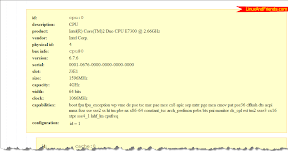
lshw output in HTML format

lshw GUI

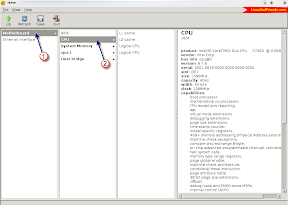
The lshw command also has an equivalent GUI  which is available as the lshw-gtk package in Debian based Linux distributions. In Ubuntu, you can install lshw GUI as follows :
$ sudo apt-get install lshw-gtk
lshw gtk front-ent
This GUI tool provides all the details in a very user friendly and structured manner which any lay person can understand.
To sum up, identifying all the PC hardware in Linux such as  processors, memory, chipset,  audio and video is made easy using the lshw command.
Email ThisBlogThis!Share to XShare to FacebookShare to Pinterest
Posted in | No comments
Newer Post Older Post Home

0 comments:

Post a Comment

Subscribe to: Post Comments (Atom)

Popular Posts

  • Linux Kernel /etc/sysctl.conf
    /etc/sysctl.conf can be a powerful way of changing kernel settings at run-time. If you have sysctl.conf support compiled into your kernel, y...
  • Domain name formulation
    The right-most label conveys the top-level domain; for example, the domain name  www.example.com  belongs to the top-level domain com. The h...
  • How To Add a non-login User in Linux so that he/she doesn't have shell.
    useradd & usermod commands are used to add and modify the users in linux. When invoked without the -D option, the useradd command creat...
  • To Increase Networking Performance Network Stack (Buffers Size)
    By default the Linux network stack is not configured for high speed large file transfer across WAN links. This is done to save memory resour...
  • SVN Server on RHEL6
    Subversion (SVN) is a version control system initiated in 2000 by CollabNet Inc. It is used to maintain current and historical versions of f...
  • Types of NameServer
                                                            There are four primary nameserver configuration:    Master Server:  The primary mast...
  • Apache Security with SELinux
    Security with Apache is an important topic, of which SELinux is a part. The reason for discussing SELInux at this point is so that you have ...
  • How do I hide the Apache version number under Linux server?
    You can easily hide Apche (httpd) version number and other information. There are two config directives that controls Apache version. The S...
  • Configuring ssh Server
                                                          SSH SERVER CONFIGURATIONS ssh command is a client remote login program to connect remo...
  • TOP - Process Activity Command
    The top program provides a dynamic real-time view of a running system i.e. actual process activity. By default, it displays the most CPU-int...

Blog Archive

  • ►  2013 (19)
    • ►  July (1)
    • ►  June (6)
    • ►  May (1)
    • ►  April (11)
  • ▼  2012 (12)
    • ▼  December (11)
      • 20 ways to Secure your Apache Configuration
      • How do I hide the Apache version number under Lin...
      • Apache Security with SELinux
      • SVN Server on RHEL6
      • Displays The Processes
      • Tell How Long The System Has Been Running
      • TOP - Process Activity Command
      • Types of NameServer
      • Configuring ssh Server
      • Domain name formulation
      • lshw command – List hardware information in Linux
    • ►  November (1)
Powered by Blogger.

About Me

Unknown
View my complete profile